One clear view of your Amazon catalogue. Listings, errors, ads and growth.
A big Amazon catalogue is hard to hold in your head, and Amazon is not much help — suppressions arrive unannounced and the reasons come as codes. Grow keeps the whole picture in one place: UK listings checked three times a day and every EU market daily, every error code explained in plain English — what broke, who fixes it, what to do — your ad spend tracked down to the keyword, and a ranked list of where your next bit of growth is hiding. Your team opens it in the morning and knows what to work on.
Made for hundreds or thousands of ASINs. At ten products you can do all this by hand. At two thousand, across nine markets, nobody can — and that is the whole point.
See your catalogue clearly →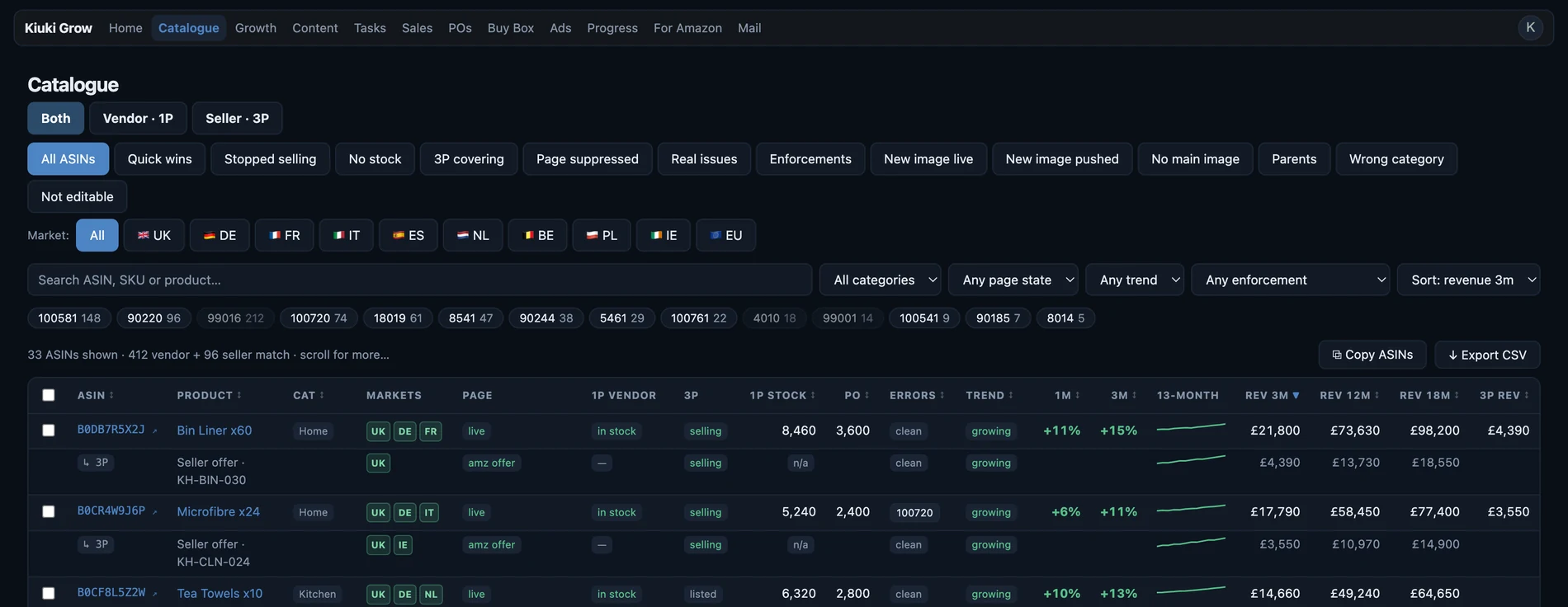
Grow was not built from a spec. It runs every day on a live Amazon vendor account of 2,600 ASINs across nine European marketplaces, three vendor codes, thousands of purchase-order lines and a six-figure monthly ad spend. Every feature here exists because that account needed it, and every one of them has been wrong at least once and been fixed.
How much of this sounds familiar?
Tick the ones you recognise. Most teams running a large catalogue tick at least four.
- A listing got suppressed and you found out from the sales dipAmazon doesn't call. The page dies quietly and the money stops.
- Error codes nobody understands, so nobody fixes them8029? 18784? 300404? Which block sales, which are noise, whose job is which?
- You uploaded new images, Amazon said "accepted" — and the old ones still showAccepted is not displayed. Nobody tells you the difference.
- Compliance and case emails scattered across three inboxesDocuments requested, deadlines missed, listings stranded — because a thread got buried.
- Products that quietly stopped selling months agoIn a big catalogue, dead listings hide. Each one used to pay for itself.
- POs cut or short-filled and you can't say whyConfirmation rate looks fine; fill rate tells another story. Few vendors track both.
- Ad spend rising, and you can't tell which keywords earn itHalf the catalogue sits in one catch-all campaign with no bid tuned to it, and nobody knows which terms convert.
- Your EU markets are worse than the UK — but no one audits themShared ASINs, different rules, errors multiplying in languages nobody reads.
Grow finds them. Then it helps you fix them.
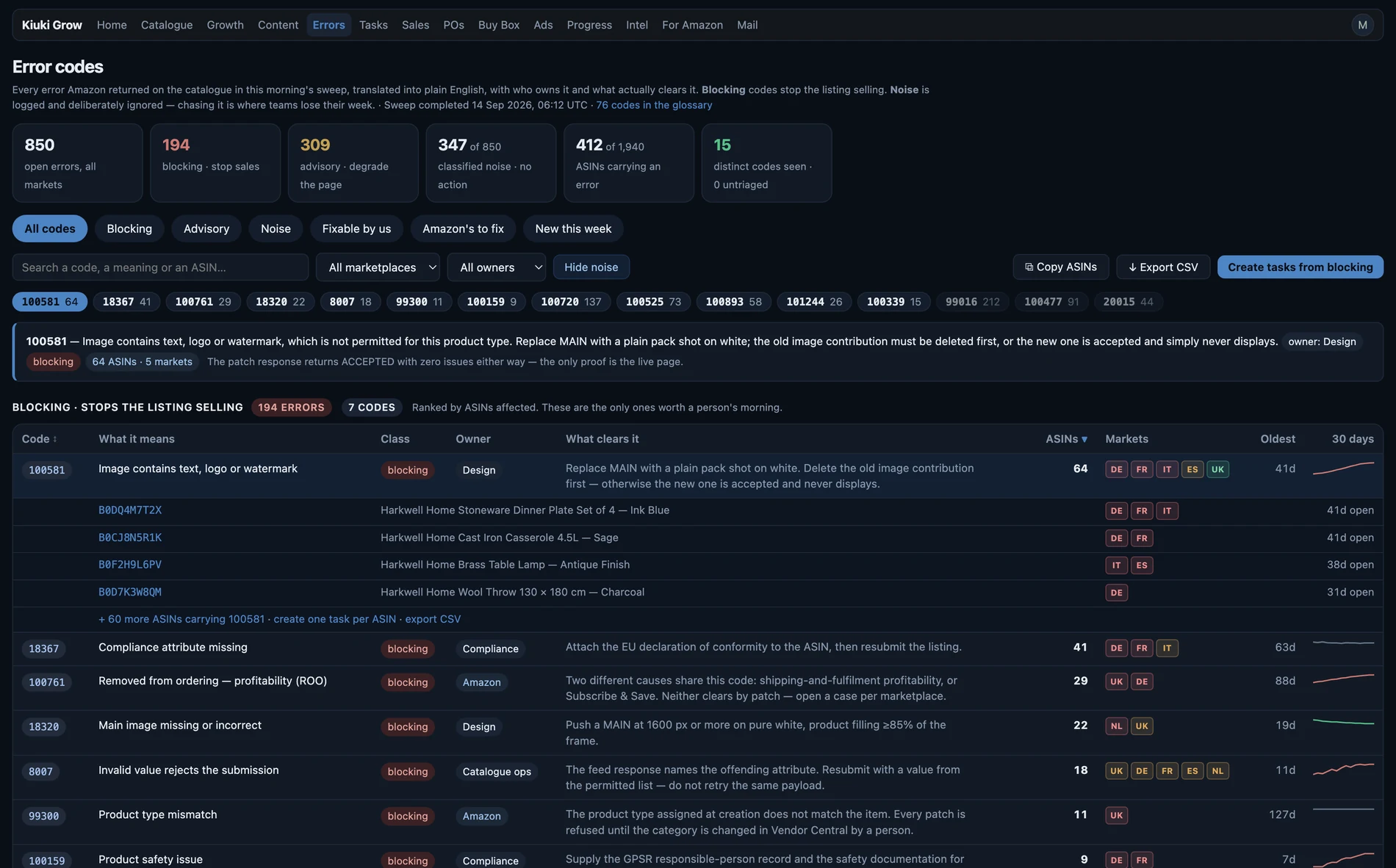
This is Amazon compliance automation, end to end: every listing swept daily, every error code translated into an owner and an action, compliance documents stored against each ASIN, correspondence with Amazon drafted with the right files attached — and the fix verified when the error actually clears, not when someone says it did.
Finding problems is the easy half. The fix-loop is the product: every issue becomes a task with an owner, the documents attach to it, the reply to Amazon drafts itself — and when Amazon clears the error, the task closes on its own.
- ✓Finds suppressions the day they happenUK listings swept three times a day and every EU market daily — page-level suppressions, attribute blocks, removals, all separated honestly.
- ✓Triages every error codeWhat it means, whether it blocks sales, who owns the fix, what to do — noise excluded so your team works real issues.
- ✓Turns Amazon emails into tasksForward case mail to your Grow address: tasks appear per ASIN with what's missing, documents attach, and tasks close themselves when Amazon clears the error.
- ✓Proves images actually displayGrow downloads what Amazon really shows shoppers and compares the content — "accepted but not displayed" gets caught, not assumed.
- ✓Watches sales per ASINDaily and monthly trends, true year-over-year, and a stopped-selling list ranked by what each listing used to make.
- ✓POs with the metric that mattersConfirmation rate vs fill rate, side by side, year over year — the gap between them is where vendors lose accounts.
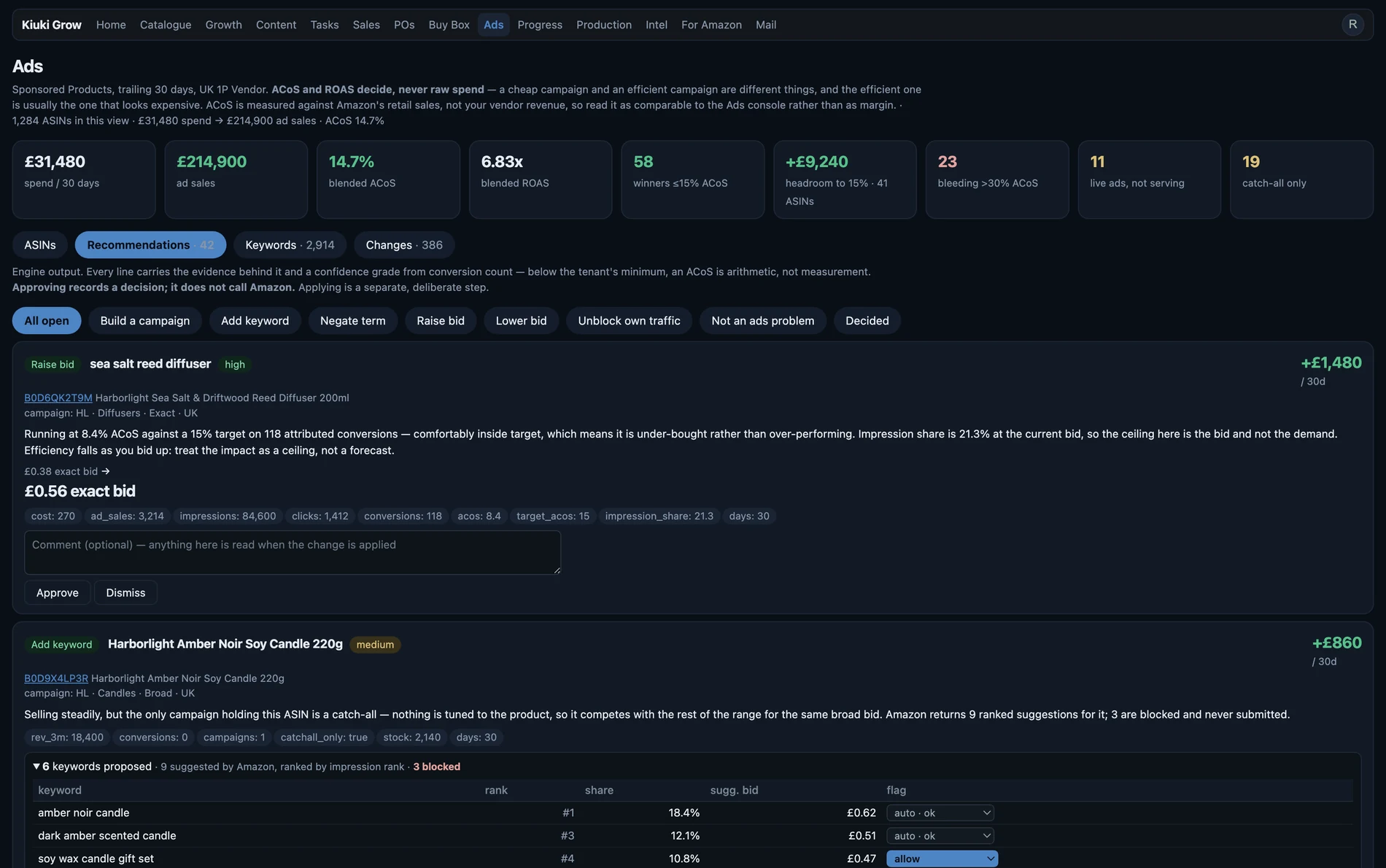
- ✓Amazon Ads, down to the keywordEvery campaign, keyword and product target with its real ACoS against your target — plus the ASINs covered only by a catch-all, converting search terms worth promoting, and negative keywords quietly blocking your own products.
- ✓Bid moves you can actually checkEvery suggested bid carries the conversions behind it, so you can tell a real signal from arithmetic on four clicks. Competitor brands and health claims are refused outright — they never belong in a keyword field.
- ✓Connect your own AI, if you want oneGrow works fine without it. If you do use Claude or another assistant, point it at your tenant over MCP and it reads your catalogue directly.
- ✓Your data stays yoursHard tenant isolation at the database layer, role-scoped access, and read-only against Amazon — Grow can never touch your prices.
Fixing is half of it. Growing is the other half.
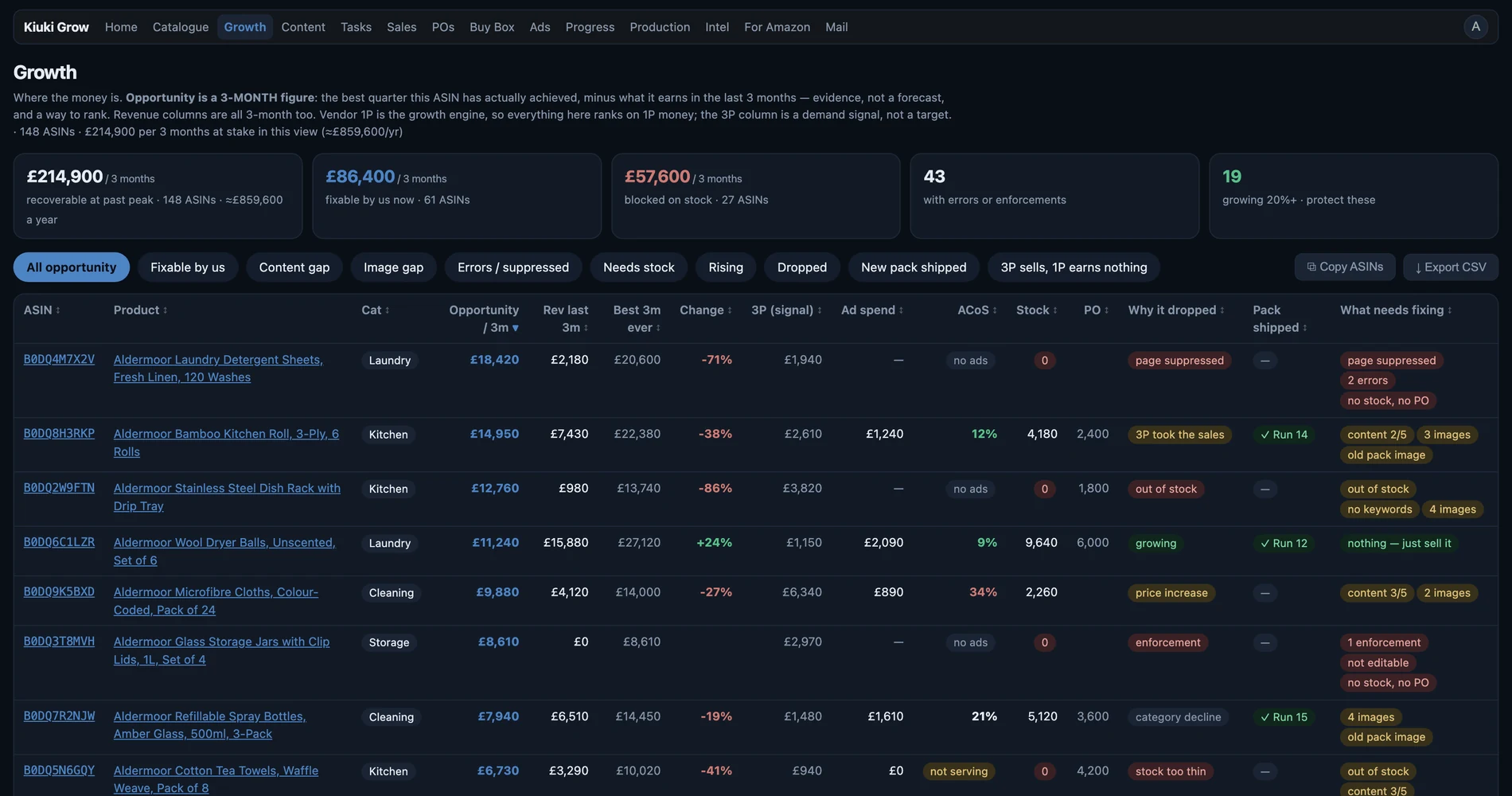
Every listing you repair is revenue you kept. The Growth view is about the revenue you haven't earned yet.
- ✓Ranks every ASIN by what it could be worthNot by what it sold — by the gap between what it sells and what its category, stock and history say it should. The top of that list is where your next month's growth is.
- ✓Finds the quick wins firstListings a single fix away from selling again: an image that never displayed, a missing attribute, a suppression nobody noticed, a keyword field left empty since launch.
- ✓Shows what stopped, and what it used to makeProducts that quietly died months ago, ranked by the revenue they used to bring in — so you fix the £4,000 one before the £40 one.
- ✓Points ad money at what deserves itWhich ASINs earn their spend, which sit in a catch-all with no bid tuned to them, and which converting search terms are worth a keyword of their own.
- ✓Scales past the point a person can hold itThe work doesn't grow with your catalogue — the same morning list covers 200 ASINs or 5,000, in one market or nine. Adding products stops being a reason to hire.
- ✓Opens the same view to your team and your agencyRole-scoped access means your agency, your Amazon vendor manager and your own staff work from one list instead of three spreadsheets and a meeting.
Why not just have someone check it?
Because at this size, nobody can — and the person you'd ask has better things to do.
Checking by hand
- 2,600 ASINs across nine markets is 23,400 listing pages to look at
- By the time you reach the end, the start has changed
- Error codes get skipped because nobody knows which ones matter
- And "I uploaded the image" is not the same as Amazon showing it
Grow
- Listings and errors checked three times a day in the UK and daily in every EU market, with images, ads, sales and POs alongside
- Every result checked mechanically — images compared pixel-side, codes triaged
- You read a fix-list, not a catalogue
- Your team spends the day fixing, not finding
Plans
One price, whole catalogue — however many ASINs you run. No per-ASIN games. Cancel any time. Billed in USD, GBP or EUR — your choice at checkout.
Grow Intelligence (MCP)
£545 · €640
- Full catalogue platform — every feature above
- Listings, errors, images, ads, sales and POs, all markets
- Unlimited users, role-scoped (good for agencies & your Amazon contacts)
- Connect your own AI over MCP if you use one
Grow Copilot
£1,020 · €1,190
- Everything in Grow Intelligence
- Assistant built in — nothing of your own to subscribe to
- Drafts compliance replies and case answers for your approval
- Same hard tenant isolation
Grow + Agency
A senior Amazon specialist, not a ticket queue
- Everything in Grow Copilot
- A senior Amazon expert working your account directly
- Suppressions, cases and escalations handled for you
- Ads managed to an agreed ACoS target
- Scoped to your catalogue — talk to us first
Questions you should ask
Can Grow change my prices or delete listings?
No — structurally. Grow's Amazon access is read-only for anything commercial. There is no code path that writes a price, and no way to delete a listing. That's a design guarantee born from painful vendor experience, not a settings toggle.
Is my data separated from other companies?
Yes — every row in the database is tenant-isolated at the database engine level (PostgreSQL row-level security), not just in application code. Your API keys reach only your data, and restricted roles exist for external collaborators like Amazon vendor managers.
What do I need to get started?
A Seller or Vendor Central account. Sign up, connect, and your catalogue starts syncing the same day. Forward your Amazon case emails to your Grow address whenever you're ready — that part takes two minutes.
What does "your own AI" mean?
Grow exposes an MCP endpoint — the open standard AI tools use. Point Claude (or any MCP-capable assistant) at it with your key, and your AI can read your catalogue, find issues, and file tasks — scoped to your tenant, with no way to see anyone else's data.
See what your catalogue actually looks like today.
Connect your Seller or Vendor account and the first sweep runs the same day. No call required, cancel any time.
Start now →